
I don’t trust vague travel budgets. About $2,000 for a week in Europe
tells you almost nothing. Is that per person? Does it include flights? Insurance? And what happens if prices jump 15% a month before you leave?
If you want an accurate vacation budget, you need a simple system, not a guess. In this guide, you’ll build your own total trip cost calculator you can reuse for every trip – in a spreadsheet, a notebook, or even as a DIY web-based vacation budget calculator system if you like to code.
By the end, you’ll have a repeatable setup that:
- Covers every major cost (including the sneaky ones)
- Shows total, per-day, and per-person costs
- Includes a realistic buffer for surprises
- Connects directly to a savings plan
1. Decide What Your Calculator Must Actually Do (Before You Touch a Spreadsheet)
Most people open a spreadsheet and start typing numbers. That’s how you end up with a messy file you never trust.
Start with the job your total trip cost calculator needs to do for you.
Your calculator should answer at least these questions:
- What is the full cost of this trip? Not just flights and hotels. Everything.
- How much is that per person? So you can split fairly with friends or a partner.
- How much is that per day? So you know what you can spend without stress.
- What if I change something? Fewer days, cheaper hotel, different destination – how does that change the total?
- How much do I need to save each month? So the trip is paid for before you go.
Online tools like the MiniWebTool Travel Budget Calculator and Sum.money Vacation Budget Calculator already do this well. They combine all categories, show per-day and per-person numbers, and add a buffer. You’re going to borrow that logic and turn it into your own DIY travel budget calculator.
Before you build anything, jot down:
- Your trip idea (destination, rough dates, who’s going)
- Your currency (pick one base currency and stick to it)
- Whether you care more about total cost or daily comfort (this changes how you tweak the numbers)
Once that’s clear, then it’s worth opening a sheet.

2. Map Every Cost into the Right Bucket (This Is Where Accuracy Comes From)
The fastest way to wreck a vacation budget? Mix all your costs together and hope it works out. It rarely does.
A solid trip cost planning framework treats different expenses differently. That’s what makes your travel cost breakdown template accurate instead of wishful thinking.
Here’s the structure I use, inspired by tools like MiniWebTool, Sum.money, and detailed templates from Yopki and WordTemplatesOnline.
Core categories your calculator must include
- Flights & long-distance transport (per person, one-off)
- Accommodation (per night, for the whole group)
- Food & drinks (per person, per day)
- Local transport (per person, per day or per trip)
- Activities & attractions (per person, per activity)
- Insurance & visas (per person or per trip, one-off)
- Shopping & extras (per person or group, one-off)
- Pre-trip costs (gear, vaccines, documents)
- Buffer / contingency (percentage of the total)
Now comes the important part: for each category, decide how your vacation budget calculator system will treat it.
| Category | Type | How to calculate |
|---|---|---|
| Flights | Per person, one-off | Flight cost × number of travelers |
| Accommodation | Per night, group | Nightly rate × number of nights |
| Food | Per person, per day | Daily food budget × days × travelers |
| Local transport | Per person, per day or per trip | Daily estimate × days × travelers (or sum of known trips) |
| Activities | Per person, per activity | Sum of all planned activities × travelers |
| Insurance & visas | Per person or group, one-off | Policy/visa cost × travelers (or group total) |
| Extras & shopping | Per person or group | Set a realistic cap and stick to it |
| Pre-trip costs | One-off | Sum of gear, vaccines, documents, etc. |
Once you’ve mapped everything, your total vacation cost breakdown can finally show you where the money actually goes. That’s how you decide whether to cut a day, downgrade a hotel, or skip a pricey tour without guessing.
3. Build the Engine: Formulas for Total, Per-Day, and Per-Person Costs
Now let’s turn this into a working step by step trip budget planner. I’ll describe it as a spreadsheet, but the logic is the same if you’re building a web tool or a simple travel expense notebook.
Step 1: Set your inputs
Create an Inputs section with cells for:
- Number of travelers (T)
- Number of nights (N)
- Currency (just a label, but keep it consistent)
Then add input rows for each category:
- Flight cost per person
- Nightly accommodation cost (for the group)
- Daily food budget per person
- Daily local transport per person
- Activities (list them individually or as a total per person)
- Insurance per person (or group total)
- Visas per person
- Pre-trip costs (gear, vaccines, etc.)
- Extras/shopping budget
This is the core of your travel expense spreadsheet setup. Keep it clean and grouped by category so it’s easy to tweak later.
Step 2: Calculate category totals
Now add formulas. In plain language:
- Total flights = flight_per_person × T
- Total accommodation = nightly_rate × N
- Total food = daily_food_per_person × N × T
- Total local transport = daily_transport_per_person × N × T
- Total activities = (sum of all activity costs per person) × T
- Total insurance = insurance_per_person × T (or group total)
- Total visas = visa_per_person × T
- Total pre-trip = sum of all pre-trip items
- Total extras/shopping = extras_budget
At this point, you already have a basic full trip cost estimate formula by category.
Step 3: Add the buffer
This is where you protect yourself from reality. Prices change. You forget things. Exchange rates move.
Most calculators I trust recommend a 10–20% buffer. MiniWebTool and Sum.money both suggest around 10–15%. I usually go with:
- 10% for cheap, predictable trips (off-season, familiar places)
- 15–20% for peak season, remote destinations, or volatile currencies
Use these formulas:
- Subtotal (no buffer) = sum of all category totals
- Buffer amount = subtotal × buffer_percentage
- Grand total = subtotal + buffer_amount
That buffer is your first line of defense against hidden costs in vacation budgeting.
Step 4: Derive per-person and per-day numbers
Now you turn a big scary number into something you can actually feel.
- Total per person = grand_total ÷ T
- Total per day (trip) = grand_total ÷ N
- Daily spending money per person (excluding flights & pre-trip) = (grand_total − flights − pre_trip) ÷ (N × T)
That last line is gold. It answers: How much can I spend per person per day, on the ground, without blowing the trip?
4. Make It Realistic: Destination, Season, and Travel Style Adjustments
A calculator is only as good as the assumptions you feed it. This is where a lot of people quietly sabotage their accurate vacation budget planning.
Instead of guessing, lean on research-based tools like the Calculators.wiki Trip Cost Calculator and country-level daily cost estimates from blogs and guidebooks.
Use travel tiers or country benchmarks
Sum.money uses three tiers (Budget, Mid-range, Luxury) with global average daily costs. You can copy that idea in your own total trip cost calculator:
- Budget: basic guesthouses/hostels, local food, public transport
- Mid-range: decent hotels/apartments, mix of local and nicer meals
- Luxury: high-end hotels, frequent taxis, fine dining
Then adjust by region. For example:
- Budget travel is much easier in Southeast Asia, Eastern Europe, Central America
- Expect higher baselines in Western Europe, US/Canada, Japan, Australia
In your calculator, you can either:
- Use a dropdown for travel style that fills in default daily costs, or
- Manually enter daily food/accommodation/transport based on your research
Season and location tweaks
Timing matters more than most people think. Your end to end travel cost planning should nudge you to adjust for:
- High season: increase accommodation and sometimes flights by 20–50%
- Remote areas: bump food and transport; fewer cheap options
- City center vs outskirts: cheaper lodging often means higher daily transport
Even a simple note like Season factor
or a checkbox for Peak season
that reminds you to increase certain inputs can keep your assumptions honest.
Currency and exchange rates
Pick one base currency for your calculator and stick with it. Then:
- Use a live rate from a converter (like the one linked from Calculators.wiki)
- Add a small exchange rate cushion (2–5%) if your home currency is volatile
In a more advanced sheet (like the Yopki template), you can log expenses in local currency and auto-convert. For planning, though, a single base currency keeps your trip cost planning framework simple and less error-prone.
5. Don’t Forget the Sneaky Costs (This Is Where Budgets Blow Up)
Most my trip cost way more than I expected
stories come from the same blind spots. Your calculator should force you to look at them.
Pre-trip and preparation costs
Borrowing from WordTemplatesOnline and Yopki, here’s a simple breakdown:
- Passports, visas, photos
- Vaccinations and travel clinic visits
- Luggage, backpacks, packing cubes
- Travel gear (adapters, power banks, clothing for specific climates)
These often happen months before the trip, so they feel separate. They’re not. Add a Pre-trip section and total it so your total travel cost is honest.
Insurance and protection
Travel insurance is easy to skip until you need it. Your calculator should have a dedicated line for:
- Travel insurance (medical, cancellation, luggage)
- Rental car insurance (if applicable)
- Any extra coverage not included by your credit card or memberships
Before you add a big insurance cost, check whether your credit card or memberships already cover some of it – a tip echoed in TravelClosely’s budget calculator guide.
Local transport traps
People budget for flights and forget the smaller, constant hits:
- Airport transfers
- Day trips outside the city
- Tolls, parking, fuel, and rental insurance on road trips
For road trips, add a mini-section to your travel cost breakdown template:
- Estimated total distance × fuel cost per km/mile
- Tolls and parking (daily estimate × days)
- Rental car base cost + insurance + one-way fees
Activities and attractions
These are the fun parts – and the easiest to underestimate.
Your calculator should push you to list:
- Museums, monuments, temples
- Guided tours and day trips
- Adventure activities (diving, skiing, etc.)
TravelClosely is blunt about this: attraction fees add up fast. Don’t just write $200 for activities
. List them, even roughly, and total them. That’s how you avoid classic trip budget mistakes.

6. Turn the Calculator into a Decision Tool (Not Just a Big Number)
Seeing a total trip cost is useful. But the real power is using that number to make decisions before you book anything.
Play with scenarios
Once your formulas are in place, start testing what-if questions:
What if we cut 2 nights?
– watch accommodation and food drop, but flights stay the same.What if we upgrade hotels but cook more?
– increase accommodation, decrease food.What if we travel off-season?
– reduce flights and accommodation by a percentage.
This is exactly how tools like MiniWebTool and Sum.money help you compare total trip cost by destination and by timing. Your own sheet can do the same, just more tailored to you.
Highlight the biggest cost drivers
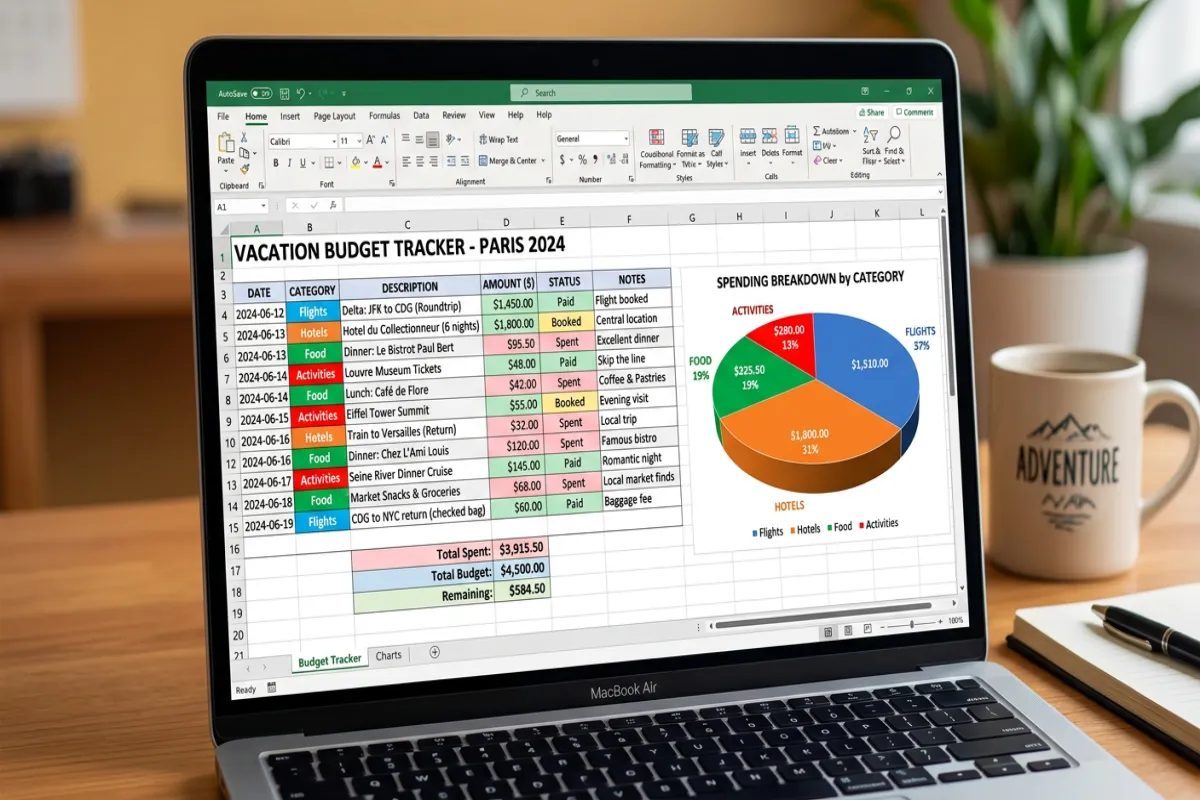
Borrow a trick from Yopki’s dashboard: show a simple breakdown of what percentage of your budget goes to:
- Flights
- Accommodation
- Food
- Transport
- Activities
- Other
When you see that, say, 45% of your budget is accommodation, you instantly know where small changes have a big impact.
Daily pressure check
I like to calculate two daily numbers:
- Daily cost including flights = grand_total ÷ N
- Daily cost excluding flights & pre-trip = (grand_total − flights − pre_trip) ÷ N
The second one tells you how much you’re burning
each day on the ground. If that number feels stressful, you either need to save more, cut costs, or shorten the trip. That’s how your total trip cost calculator becomes a real decision tool, not just a fancy sum.
7. Connect Your Trip Cost to a Savings Plan (So the Money Is Actually There)
Many people stop at The trip will cost $3,500
. Then they put it on a credit card and deal with it later.
Instead, build the savings plan into your trip budget planner so the money is ready before you leave.
Sum.money does this nicely with a savings planner. You can recreate it in a few lines.
Add a savings section
Inputs:
- Grand total trip cost (from your main calculator)
- Current savings for this trip
- Months until departure
Formulas:
- Amount still needed = grand_total − current_savings
- Monthly savings target = amount_needed ÷ months_until_departure
- Weekly savings target = monthly_target ÷ 4 (roughly)
Then ask yourself: Is that monthly number realistic?
If not, you have three levers:
- Push the trip back
- Cut the total cost
- Increase your monthly savings (by cutting other expenses)
Guides like HeyThereTravel and WordTemplatesOnline both recommend a separate travel savings account. It pairs perfectly with your vacation budget calculator system: the calculator gives you the target; the account keeps you honest.

8. Make Your Calculator a Living Document, Not a One-Off
The last step is mindset. A good total trip cost system isn’t something you fill out once and forget. It’s a living document you refine over time.
Here’s how I use mine:
- Planning phase: I play with scenarios until the total, daily, and monthly savings numbers feel right.
- Booking phase: I replace estimates with actual prices as I book flights, hotels, and activities.
- On the trip: I track daily spending (even roughly) to see if I’m under or over my daily target.
- After the trip: I compare planned vs actual and adjust my assumptions for the next trip.
Templates from SpreadsheetPoint and Yopki are great examples of this plan → track → review
loop. You don’t have to be that detailed, but even a simple planned vs actual
column will make your next total travel cost estimate far more accurate.
Build your calculator with that mindset and it stops being a one-time spreadsheet. It becomes your personal DIY travel budget calculator you reuse for years – and that’s where the real savings (and sanity) come from.
So, your next step: open a blank sheet, set up the categories and formulas, and run your next trip through it. Don’t just ask Can I afford this trip?
Ask: Exactly how much will it cost, per person, per day – and what will I change if I don’t like the answer?