
I’ve spent a lot of time chasing so-called “secret” airfare tricks. VPN locations, foreign currencies, local payment methods, incognito windows – I’ve tested them, read the data, and compared notes with other obsessive flight hunters.
The uncomfortable truth: most viral hacks don’t work nearly as well as the screenshots suggest. But a few advanced tactics do sometimes move the needle – if you understand what’s really going on under the hood.
Let’s walk through when VPNs, foreign currencies, and local payment methods actually help, when they backfire, and how to use them without wasting hours or risking a canceled ticket.
1. Should You Even Bother With a VPN for Flights?
Let’s start with the big question: If I change my location with a VPN, will flights get cheaper?
Across multiple controlled tests from PCMag, CNET, USA Today, and others, the pattern is boringly consistent:
- Flight prices are usually identical or within a few dollars no matter which VPN country you pick.
- Occasional savings are modest – think 5–7% at best, and often less than the cost of a VPN subscription itself.
- Sometimes the VPN price is actually higher.
PCMag’s tests found prices were “almost always identical or within a tiny margin” across regions. CNET saw most flights within about $1 of each other, with one outlier saving around $63 on a long-haul route. A 2025 roundup on Hexsus concluded using a VPN for cheaper flights helps maybe 5% of the time, and even then only by a small percentage.
Why? Because airlines and booking sites have evolved. They don’t just look at your IP anymore. They use:
- Browser fingerprinting
- Device data and mobile GPS
- Billing address and card country
- Account history and loyalty profiles
So if you’re hoping a VPN alone will unlock half-price business class, you’re going to be disappointed.
My rule: Treat VPN flight hunting as a low-effort experiment
, not a core strategy. If it takes you more than 10–15 minutes to test, you’re probably wasting time.
2. The Real Mechanism: Point-of-Sale Pricing, Not “Magic IP Tricks”
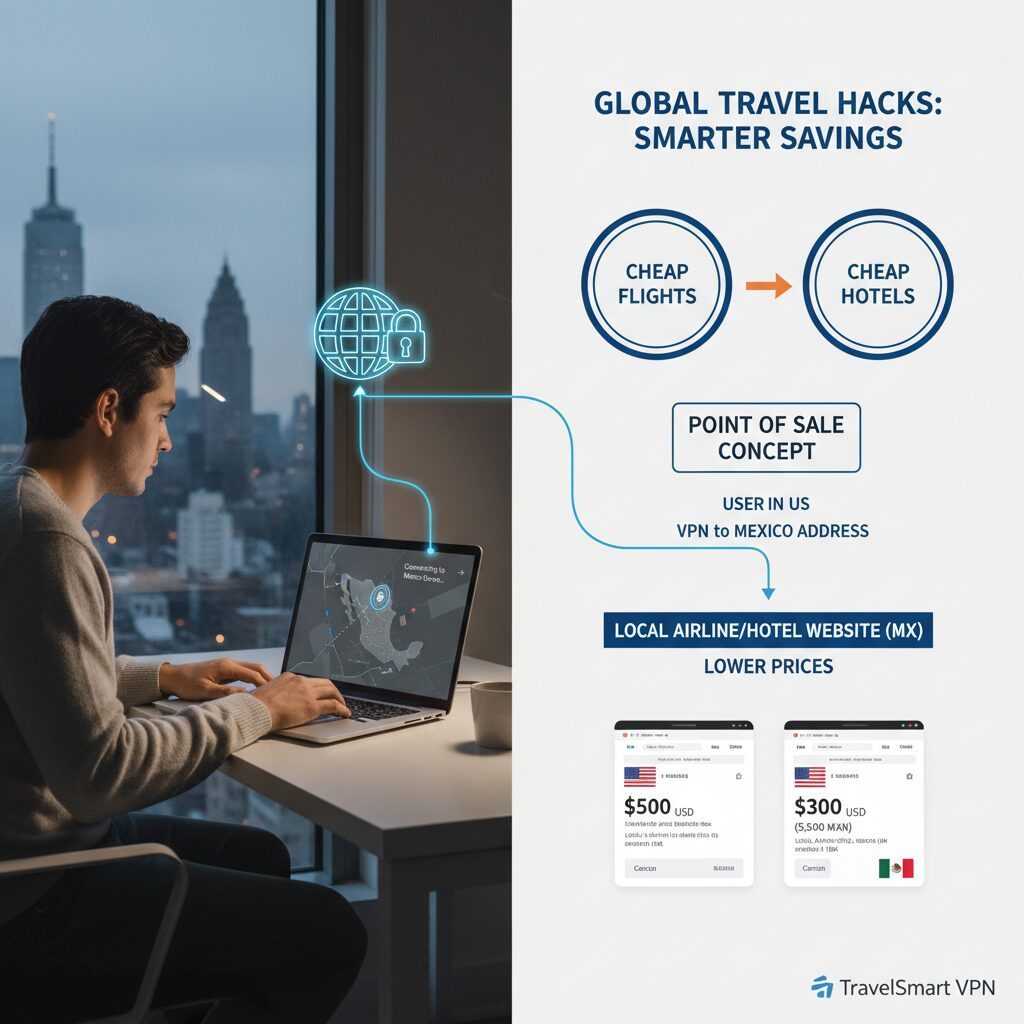
When VPNs do help, it’s usually not because you “fooled” the airline. It’s because you’ve changed your point of sale (POS) – the market where the ticket is being sold.
Airlines sometimes price the same seat differently in different countries to match local purchasing power or run regional promos. That’s POS pricing. A VPN can occasionally let you see and book those local fares and compare airline ticket price differences by country in a more direct way.
Think of airfare pricing as a pyramid of influences:
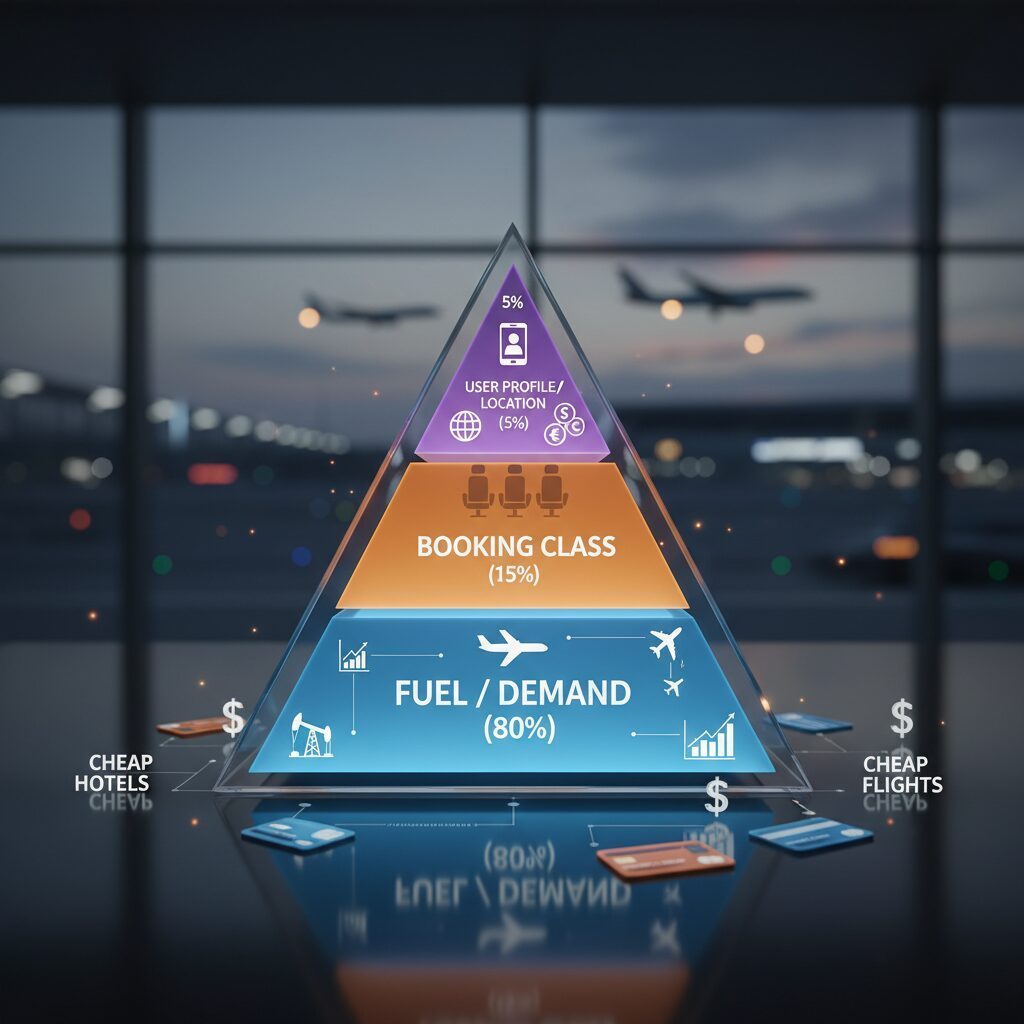
- Base (80%): Fuel, demand, competition, route popularity.
- Middle (15%): Fare class (how many cheap seats are left in each bucket).
- Top (5%): User profile, location, POS quirks.
VPNs only touch that top sliver. That’s why the effect is small and inconsistent.
Hexsus, summarizing 2024–2025 data, puts it bluntly: VPNs rarely deliver the dramatic flight savings shown on social media; price differences are usually within a few dollars.
When POS differences can matter:
- Routes heavily marketed to a specific country (e.g., a national carrier’s home market).
- Countries with significantly lower average incomes, where airlines sometimes adjust prices.
- Special regional sales that don’t show on your home-country site.
But even then, airlines and banks often re-price based on your card country at checkout, which kills the advantage.
3. A Practical VPN Test That Takes 10 Minutes (Not 2 Hours)
If you still want to try, here’s how I run a quick, sane experiment without falling down a rabbit hole of compare VPN vs no VPN flight prices for hours.
Step 1: Start with your real location
- Search your route and dates on 2–3 places: the airline’s own site, Google Flights, and one OTA (like Expedia or Booking).
- Note the exact flight number, fare type, and total price with fees.
Step 2: Clean your slate
- Open a fresh incognito/private window.
- Log out of any airline or OTA accounts.
- Don’t obsess over cookies – tests show they’re not the main driver – but this keeps your comparisons clean.
Step 3: Pick 2–3 strategic VPN locations
Based on the research, I focus on:
- The airline’s home country (e.g., Turkey for Turkish Airlines, Japan for ANA).
- A lower-income market that still makes sense for the route (e.g., India, Mexico, Thailand).
- Sometimes a “neutral” European hub (e.g., Poland, Croatia) if I’m really curious.
NordVPN’s own marketing claims places like Turkey, Poland, Croatia, and Moldova can be cheaper – but USA Today’s tests with Turkey didn’t show savings. So I treat these as maybes, not guarantees.
Step 4: Repeat the same search, exactly
- Same dates, same cabin, same flight numbers where possible.
- Compare final prices in your home currency (use the site’s currency toggle or a converter).
Step 5: Decide fast
- If you see 5–10% cheaper for the exact same flight and fare rules, it might be worth it.
- If the difference is under 3–4%, I usually skip it – the risk and hassle aren’t worth a few dollars.
And if you find nothing after 2–3 locations? I stop. The data says you’re unlikely to suddenly uncover a miracle price on the ninth server.
4. Foreign Currencies & Local Payment Methods: Where the Real Arbitrage Lives
Here’s where things get more interesting. Sometimes the trick isn’t where you appear to be, but how you pay.
Even when the base fare is the same, you can gain or lose money through:
- Currency conversion rates
- Foreign transaction fees
- Local-only discounts or promo codes
Some OTAs and airlines quietly offer better prices to users paying in a local currency with a local card or method (like iDEAL, Boleto, or local bank transfers). TikTok stories about huge savings on Agoda or Booking.com often fall into this bucket – but the research shows a catch.
The Traveler and others found that:
- Yes, you might see a cheaper price when you first switch to a foreign site.
- But at payment, the system detects your foreign card and either:
- Re-prices the ticket in your home currency, or
- Declines the transaction or flags it as suspicious.
When foreign currencies can genuinely help:
- You have a no-foreign-transaction-fee card and your bank uses good FX rates.
- The site lets you pay in the airline’s home currency and the price is clearly lower after conversion.
- You’re comfortable with the risk that customer service and T&Cs may be in another language.
In those cases, choosing to book flights in foreign currency can sometimes shave off a few percent, especially if the site’s own conversion to your currency is terrible.
But be careful with “dynamic currency conversion” (DCC). If the site or payment page offers to charge you in your home currency “for convenience,” that rate is often worse than your bank’s. I almost always choose to pay in the original currency and let my card handle the conversion.
Used well, this is one of the more reliable advanced airfare booking tactics: pay in the airline’s currency with a strong card, and avoid junk conversion rates.
5. The Hidden Risks: Fraud Flags, Cancellations, and Fine Print
This is the part most TikTok videos skip.
When you mix VPN locations, foreign currencies, and non-local cards, you’re basically waving a little flag that says Hi, I might be fraud.
Airlines and OTAs are understandably jumpy about that.
Across PCMag, The Traveler, and Hexsus, the same warnings keep popping up:
- Payment failures: Your bank may decline the charge because it looks suspicious (foreign IP, foreign merchant, foreign currency).
- Frozen cards: Multiple failed attempts from different “countries” can trigger security holds.
- Ticket cancellations: Some airlines reserve the right to cancel tickets bought through channels or markets you “weren’t supposed” to use.
- Account blacklisting: Repeatedly tripping fraud systems can get your OTA or airline account flagged.
- Language & T&C traps: Booking on a foreign-language site increases the risk you misunderstand fare rules, baggage, or name formats.
There’s also the question of which VPN you use. Free or shady VPNs can log your data, inject ads, or even compromise your payment details. Multiple sources recommend sticking to reputable providers (ExpressVPN, NordVPN, Surfshark, CyberGhost) if you’re entering card info.
My personal risk filter:
- If I’m saving $10–20 on a $600+ ticket, I don’t bother with VPN/currency gymnastics.
- If I’m saving $100+ per ticket and the site is reputable, I’ll consider it – but I screenshot everything and read the fare rules carefully.
- If the site looks sketchy or the process feels fragile, I walk away. A canceled ticket at the airport is never worth the “deal.”
6. Incognito, Cookies, and the Myth of “They’re Punishing Me for Searching Too Much”
You’ve probably heard this one: The more you search a route, the higher the price goes. Clear cookies or use incognito to reset it.
It’s a satisfying story. It also doesn’t hold up well in tests.
OrderExpress and others have run side-by-side comparisons and found:
- Prices in regular vs. incognito mode are usually the same.
- When prices jump, it’s usually because cheaper fare buckets sold out while you were browsing.
- Dynamic pricing systems update constantly as seats are bought, not because you personally searched three times.
That doesn’t mean cookies and tracking don’t exist – they absolutely do. But the big swings you see are far more likely to be inventory-driven than “punishment” for your search history.
How I use this in practice:
- I do most of my searching in a normal browser window.
- I use incognito mainly when I’m testing VPN locations, just to keep sessions separate.
- I don’t obsess over clearing cookies between every search – it’s noise, not signal.
The real levers you control are timing, flexibility, and routing, not whether your browser is in private mode.
7. When Advanced Tricks Are Worth It – and When to Stick to Basics
Let’s zoom out. If VPNs and foreign currencies are mostly marginal, what actually moves the needle?
Every serious test I’ve seen ends with the same conclusion: classic good habits beat clever hacks.
High-impact tactics that consistently work:
- Flex your dates: Shifting by 1–3 days can change prices more than any VPN ever will.
- Use nearby airports: Alternate airports (especially in Europe and the U.S.) can be dramatically cheaper.
- Book at the right time window: For many routes, 1–3 months out (domestic) and 2–6 months out (international) is the sweet spot – not last-minute.
- Set fare alerts: Tools like Google Flights, Skyscanner, or Hopper catch drops you’d never see manually.
- Watch airline sales: Sign up for newsletters from airlines and deal sites; real sales beat micro-optimizations.
Then, once you’ve done all that, you can layer on the advanced stuff – the more experimental international flight booking strategies like POS testing and playing with currencies.
Smart, low-effort advanced moves:
- Run a quick VPN POS test for 1–2 key routes, as described earlier.
- Check the price in the airline’s home currency vs. your own, especially if you have a good no-fee card.
- Compare the airline’s site in two or three country versions (e.g., US vs. UK vs. local market) without going crazy.
And remember: VPNs are still very useful for travel – just not mainly for price hacking. They’re great for:
- Securing your connection on airport and hotel Wi-Fi.
- Accessing your home banking or streaming services abroad.
- Bypassing some geo-restrictions on content.
So if you already have a VPN for privacy, by all means, run a few quick tests when you book. Just don’t buy a VPN only because a TikTok promised 70% off flights.
8. A Simple Playbook: How I Actually Book My Own Flights
To make this concrete, here’s the exact sequence I use when I’m serious about getting a good fare without losing my mind.
- Start broad: I search on Google Flights to see date ranges, nearby airports, and which airlines dominate the route.
- Pick targets: I identify 1–2 realistic itineraries (flight numbers, times, airlines) that fit my schedule.
- Check direct: I price those flights on the airline’s own site and one reputable OTA.
- Set alerts: If I’m not ready to buy, I set price alerts and watch for a week or two.
- When I’m ready to book:
- I confirm the best price in my normal browser, no VPN.
- If the ticket is expensive (say, $600+), I run a 10-minute VPN/POS test on 2–3 locations.
- I compare prices in the airline’s home currency vs. my own, watching for bad conversion rates.
- Decision rule:
- If I see 5–10%+ savings from a reputable site, I consider taking it.
- If savings are tiny or the process feels fragile, I book the straightforward option and move on with my life.
Along the way, I keep an eye on local payment methods airfare savings – things like local bank transfers or regional wallets – but only if I actually have access to them. I don’t try to force a cheaper flight with a foreign credit card if it means fighting with fraud checks for days.
That’s it. No 20-tab VPN marathons. No superstition about incognito windows. Just a mix of solid fundamentals and a few targeted experiments.
If you take one thing away, let it be this: you can’t out-hack airline revenue systems with a browser trick. But you can stack small, smart advantages – timing, flexibility, POS awareness, and good payment choices – into real savings over a year of travel.
Use the tech. Stay skeptical. And spend the time you save planning a better trip, not chasing ghosts in your search history.